

For AI Overview monitoring that only needs the answer and its sources, pick a direct endpoint. For work that also needs the rest of the results page, pick a SERP API that carries the overview. Let's Scrape returns the answer and sources from one request. SerpApi, SearchApi, DataForSEO, Oxylabs, ScrapingBee and Scrapingdog deliver the overview through broader search products, each with its own billing unit and, in some cases, a second request.
The best Google AI Overview API depends on what your code needs back. If you only want the generated answer and its cited sources for a query, use an API that returns them from one request. If you already buy full Google results, an API that carries the AI Overview inside the search response can be enough. This comparison covers seven products whose official documentation describes AI Overview output: Let's Scrape, SerpApi, SearchApi, DataForSEO, Oxylabs, ScrapingBee and Scrapingdog.
Documentation and public pricing were read on November 10, 2026. The providers bill in different units (requests, searches, credits, results and per-task fees), so the prices below are converted to one workload instead of being compared plan by plan.
Run one of your queries through the direct endpoint
Which Google AI Overview API should you pick?
| Provider | How the AI Overview arrives | Fits best when |
|---|---|---|
| Let's Scrape Google AI Overviews API | One GET /ai-overview request with query, gl and hl | You only need the answer and its sources, one request per check |
| SerpApi | Inside Google Search results, or through a follow-up google_ai_overview request with a page_token | You already use SerpApi across several search engines |
| SearchApi | A google_ai_overview request with a page_token taken from its Google Search API | You need the full results page plus AI Overview text blocks and Markdown |
| DataForSEO | An ai_overview element in the Google Organic SERP task, loaded with load_async_ai_overview | You run large batches and prefer pay as you go |
| Oxylabs Web API | The dedicated /google/search scraper, which lists AI Overviews among its outputs | You want one subscription for many scraping targets |
| ScrapingBee | An ai_overviews field in its Google Search API, expanded with expand_aio=true | You already spend ScrapingBee credits on other pages |
| Scrapingdog | A second call to /google/ai_overview with a link from its Google Search API | You want many scraper APIs under one credit balance |
The last column is our reading of each provider's documentation. It is a recommendation, and no provider was benchmarked for speed or coverage in this article.
How this comparison was made
A product is on the list only if its own documentation describes AI Overview output. For each one we read the request flow, the response description, the billing unit, the free entry and the first paid plan. Every source is linked at the end with the date it was read.
Three things were left out on purpose:
- success rates and response times for the other six providers, because we did not measure them;
- enterprise and annual pricing, which the public pages do not state in a comparable way;
- Google AI Mode, which several providers sell as a separate endpoint.
Let's Scrape publishes this blog and sells one of the seven APIs. Read the fit column as a vendor's opinion and check the linked pages before you buy.
Direct request or search first: the difference that shapes your code
Google does not always put the AI Overview in the first response for a search. ScrapingBee's documentation says Google often shows it collapsed or loads it only after a click. Scrapingdog describes searches where the overview comes back through a separate request, and DataForSEO calls the same case an asynchronously loaded overview. Each provider handles that late-loading overview in its own way, and that choice decides how many calls and failure states your code has to manage.
| Provider | Extra step for a late-loading AI Overview | Documented limit |
|---|---|---|
| Let's Scrape | None. One request returns the answer and its sources | The provider opens a real browser, so responses take longer |
| SerpApi | Second request with ai_overview.page_token | The token expires within 1 minute |
| SearchApi | Second request with page_token | The token expires in less than 1 minute |
| Scrapingdog | Second request with the returned link | The link expires after 2 minutes |
| DataForSEO | Set load_async_ai_overview to true | Adds one base price to the task |
| ScrapingBee | Set expand_aio=true | 15 credits per request, and expansion is best effort |
| Oxylabs Web API | Not described on the pages we read | Check the API reference for the Google endpoint |
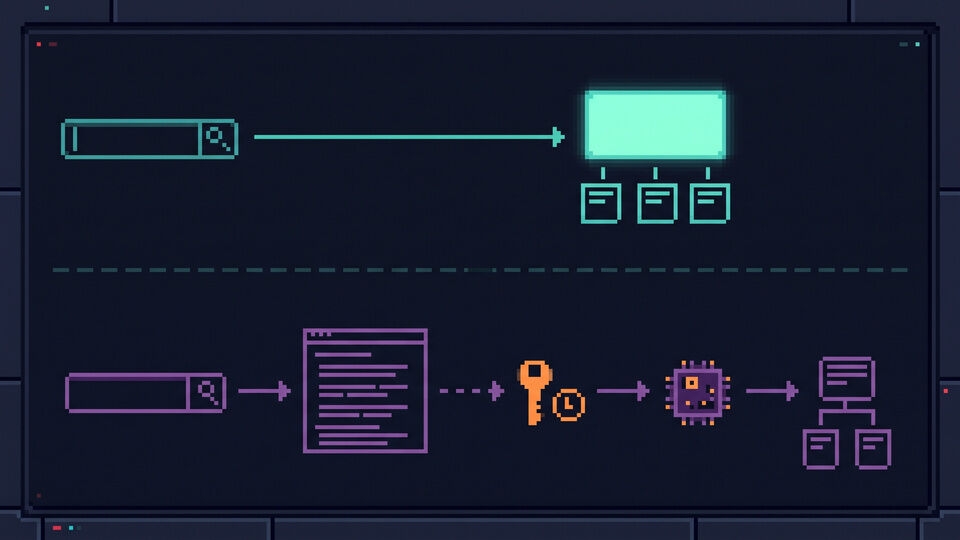
A token flow is workable, but the second call has to run right away. If the token or link expires, the job repeats the search and spends another unit. A monitoring job that stores only the answer and its sources has less to handle with a direct endpoint: one request, one response, one result state. When the product also needs organic results, ads or other search features, the search-first APIs return them in the same account and often in the same response.
What do 5,000 checks per month cost?
The workload is 5,000 queries per month in one country and language, and each check must return the AI Overview with its sources when Google shows one. The table uses the cheapest public option that covers it. Prices were read on November 10, 2026.
| Provider | Billing unit | Option that covers 5,000 checks | Monthly cost | Assumption |
|---|---|---|---|---|
| Oxylabs Web API | Results | Starter | $15 | Google with JavaScript is listed at $1.35 per 1,000 results, up to 11,000 results on Starter |
| Let's Scrape | Requests | Pro, 7,500 requests | $19 | One request per check |
| ScrapingBee | Credits | Hobby, 75,000 credits | $19 | 15 credits per request with expand_aio=true, which uses the whole allowance |
| DataForSEO | Per task | Pay as you go, $50 minimum top-up | $6 to $20 | Standard queue at $0.0006 or Live at $0.002 per task, doubled by load_async_ai_overview |
| SearchApi | Searches | Developer, 10,000 searches | $40 | Leaves room for one follow-up request per query |
| Scrapingdog | Credits | Lite, 200,000 credits | $40 | Up to 10 credits for the search plus 5 for the AI Overview call |
| SerpApi | Searches | Developer, 5,000 searches | $75 | No room for follow-up requests at this size |
At this size the monthly floor runs from $15 to $75. Oxylabs has the lowest listed subscription. Let's Scrape and ScrapingBee both cost $19, with one difference: Let's Scrape Pro leaves 2,500 requests unused, while the ScrapingBee figure holds only if every request stays at 15 credits. DataForSEO can cost less per task when queued delivery is acceptable, after a $50 top-up that does not expire.
The search-first rows depend on how often a second request is needed and how the provider counts it. That rate is not published, so measure it on your own keywords before you rely on the table. ScrapingBee states that its prices exclude VAT, and Oxylabs notes that VAT may apply. RapidAPI lists a bandwidth allowance of 10,240 MB per month for the Let's Scrape plans, so switch off include_google_results_html when you do not need the page HTML.
The order changes with volume and with the number of markets you track. The API versus DIY scraping guide shows the request arithmetic for a larger job.
The seven APIs one by one
Let's Scrape Google AI Overviews API
The Google AI Overviews API is sold through RapidAPI and has one product endpoint, GET /ai-overview. It requires query, gl for the country and hl for the language. The optional cr parameter adds a country restriction, and two switches, include_google_results_html and include_screenshot, control whether the response carries the results HTML and a screenshot for verification. The answer is in data.ai_overview and the cited pages are in data.sources.
Basic includes 200 requests per month at no charge. Pro costs $19 for 7,500 requests, Ultra $49 for 20,250 and Mega $99 for 50,000. Ultra and Mega continue at $0.003 per extra request, and the listing says failed requests are not charged. It is a single-purpose API and does not return the rest of the results page as structured data. The listing also says it opens real browsers, which costs time: in our product test on August 5, 2026, successful requests took between 5.7 and 28.9 seconds and some attempts returned a temporary HTTP 500.
SerpApi
SerpApi returns AI Overview data in its Google Search API results. When the overview is not included there, the Google AI Overview API (engine=google_ai_overview) fetches it with the ai_overview.page_token from the search response. The documentation says the token expires within 1 minute and should be used immediately. Cached searches are free, and the cache lasts one hour.
The free plan has 250 searches per month. Starter costs $25 for 1,000 searches, Developer $75 for 5,000 and Production $150 for 15,000. SerpApi covers many search engines beyond Google and lists a U.S. Legal Shield on its plans. It fits a team that already depends on that breadth. For an AI Overview-only job it is the most expensive entry in the 5,000-check table.
SearchApi
SearchApi uses the same two-step pattern. Its Google AI Overview API takes a page_token from the Google Search API response, and the documentation warns that page tokens expire in less than 1 minute. The response contains text blocks, Markdown and reference links. According to SearchApi, Google now returns those links as redirects, and a separate Google Resolve API resolves them at no charge.
New accounts get 100 free requests. The Developer plan costs $40 for 10,000 searches and Production $100 for 35,000. Only successful searches with a 200 status are billed, and the pricing page says an account can use up to 20 percent of its plan credits per hour. That hourly cap matters for a job that sends a whole day's keywords in one burst.
DataForSEO
DataForSEO has no separate AI Overview endpoint. The Google Organic SERP API returns an ai_overview element with a title, text, Markdown and links. For overviews that Google loads asynchronously, set load_async_ai_overview to true. The pricing page counts that parameter as one more base price, and the documentation says the extra charge is returned when the overview is absent or was not loaded asynchronously.
Pricing is pay as you go with a $50 minimum top-up, and the balance does not expire. A Google Organic task costs $0.0006 in the Standard queue (about 5 minutes on average), $0.0012 in the Priority queue and $0.002 in Live mode (up to 6 seconds on average). The queue modes need a POST to create the task and a GET to collect it, so the integration has more parts. For scheduled batches, the per-task price is the lowest in this comparison.
Oxylabs Web API
Oxylabs sells dedicated scrapers under one Web API. The Google target includes a /google/search endpoint, and the documentation lists AI Overviews among the Google outputs next to organic results and ads. AI Mode has its own /google/aimode endpoint. The pages we read do not describe the AI Overview fields, so check the API reference and a live response before you design storage around them.
Oxylabs gives $5 in welcome credits. The Starter subscription costs $15 per month, Basic $100 and Flexible $500. On Starter, Google with JavaScript rendering is listed at $1.35 per 1,000 results and Google without it at $1.00. That is the lowest subscription floor here. It pays off most when the same account also scrapes other targets, since one subscription covers all Oxylabs products.
ScrapingBee
ScrapingBee's Google Search API returns an ai_overviews field with answer text fragments and their references. When Google shows the overview collapsed or loads it on click, expand_aio=true expands it. The documentation says expansion needs JavaScript rendering, costs 15 credits, works with the classic and ads search types, and is best effort. A default light request costs 10 credits and may miss content.
The trial has 1,000 free credits. Hobby costs $19 per month for 75,000 credits and Freelance $49 for 250,000, excluding VAT. At 15 credits per request, Hobby covers exactly 5,000 expanded requests. ScrapingBee makes sense when the credits also pay for general page scraping. If AI Overviews are the only job, the credit arithmetic needs watching.
Scrapingdog
Scrapingdog documents a Google AI Overview API at /google/ai_overview for the case where Google returns the overview through a separate request. Its Google Search API response then contains a link, and you call the AI Overview endpoint with it. The link expires after 2 minutes, and each successful call costs 5 credits on top of the search.
The free plan has 100 credits. Lite costs $40 per month for 200,000 credits, with Google search listed at 5 credits for the light API and 10 for the advanced one. The same balance pays for the provider's other scraper APIs, which is the main reason to choose it over a single-purpose endpoint.
Test with your own queries before you subscribe
Every provider here has a free entry, so a small test costs little or nothing. Use 20 to 50 fixed queries from your real keyword list, keep the country and language constant, and include queries where you expect no AI Overview. For Let's Scrape the whole test request is:
curl --request GET \
  --url "https://google-ai-overviews.p.rapidapi.com/ai-overview?query=what%20is%20bitcoin&gl=us&hl=en" \
  --header "x-rapidapi-host: google-ai-overviews.p.rapidapi.com" \
  --header "x-rapidapi-key: $RAPIDAPI_KEY"
This shortened response keeps the field names observed in our product test on August 5, 2026. The answer, screenshot URL and HTML were cut for length:
{
  "description": "OK",
  "status": 200,
  "data": {
    "exists": true,
    "ai_overview": "[answer text omitted]",
    "sources": [
      {
        "url": "https://example.com/article",
        "title": "Example source",
        "site": "example.com",
        "position": 1
      }
    ],
    "screen_url": "[screenshot URL omitted]",
    "html": "[raw HTML omitted]"
  }
}
Run the same queries through each candidate and record four numbers per provider:
- how many checks returned an answer with at least one source;
- how many API calls and billing units one check needed;
- how long a check took, including any second request;
- how many checks failed, and whether the failure was billed.
Divide the monthly cost by the usable records to get a price per usable check. That number is more useful than any plan table, including the one above. The response field guide explains each field and error state, and the citation checker turns the same request into a domain check.
Start the 200-request free plan on RapidAPI
What no API on this list can promise
None of them can return an AI Overview that Google did not show. Google's own documentation says AI Overviews "are only shown when our systems determine that it is additive to classic Search, and as such, often don't trigger" (Google Search Central, read November 10, 2026). A valid response without an overview is a result, and your code should store it as one.
The answer and its sources also change with the country, the language and the time of the request. Store those three values with every record, or two observations cannot be compared later. All seven products read what Google displays. When Google changes the page, each provider has to update its extraction, so validate the response shape in your own code and alert on changes.
Before collecting search results at scale, review the terms and legal requirements that apply to your markets. This article compares integration work and public prices only.
Frequently asked questions
Which Google AI Overview API is the cheapest?
It depends on volume and delivery mode. For 5,000 checks per month on November 10, 2026, Oxylabs Starter had the lowest subscription at $15, followed by Let's Scrape Pro and ScrapingBee Hobby at $19. DataForSEO can cost $6 for the same volume in its Standard queue, after a $50 minimum top-up. Recalculate for your own volume, because the order changes.
Do I need a full SERP API to read AI Overviews?
No. A direct endpoint such as GET /ai-overview returns the answer and its sources without the rest of the results page. A SERP API is the better purchase when your product also uses organic results, ads or other search features.
Why do some APIs need a second request?
Because Google sometimes loads the AI Overview after the main results. SerpApi and SearchApi return a page_token for that case, and Scrapingdog returns a link. Each must be used within one to two minutes. DataForSEO and ScrapingBee handle the same case with a request parameter.
Can an API return an AI Overview for every keyword?
No. Google decides whether to show one, and its documentation says they often do not trigger. Count missing overviews separately from failed requests when you compare providers.
Sources and verification dates
All pages below were read on November 10, 2026. Prices, allowances and parameters can change, so open the provider's page before you subscribe.
- Let's Scrape Google AI Overviews API product page and the DataOcean listing on RapidAPI: endpoint, parameters, plans and overage.
- SerpApi Google AI Overview API and SerpApi pricing.
- SearchApi Google AI Overview API and SearchApi pricing.
- DataForSEO Google Organic SERP documentation and DataForSEO Google Organic SERP pricing.
- Oxylabs Web API dedicated scrapers and Oxylabs Web API pricing.
- ScrapingBee Google Search API documentation and ScrapingBee pricing.
- Scrapingdog Google AI Overview API and Scrapingdog pricing.
- Google Search Central: AI features and your website.
The response times and temporary HTTP 500 errors quoted for Let's Scrape come from a product test performed on August 5, 2026. They describe that test and are not a service guarantee. No other provider was tested.